SoftMagnat MBOX to PST Converter Software
SoftMagnat

MBOX to PST Converter

SoftMagnat MBOX to PST Converter is a professional MBOX file converter that exports emails, attachments and folders from MBOX, MBX and MBS files into Outlook PST format. Software supports batch and selective conversion, lets you preview data before saving, and works with MBOX files from Thunderbird, Apple Mail, Eudora and many other email clients.

* Download the free trial version to scan and see the preview of all convertible mailbox items.

Use Discount Coupon ( WINTOOLS20OFF ) to Get 20% Discount on Product.

Advantages of Using SoftMagnat MBOX to PST Converter

Simplifies MBOX to Outlook Migration

SoftMagnat MBOX Converter tool convert MBOX files into Outlook-compatible PST format. It helps you move mailbox data from Thunderbird, Apple Mail, Eudora and other MBOX-based clients into Outlook.

Provides Selective and Batch Conversion

Select specific MBOX files, folders or emails instead of converting everything. Batch conversion lets you process many MBOX files in one workflow and cuts repetitive manual work.

Supports Multiple Export Options

Besides PST, SoftMagnat MBOX File Converter exports to EML, MSG, PDF, HTML and RTF. Pick the output that suits your migration, archival or accessibility needs.

SoftMagnat MBOX to PST Converter – Key Features

SoftMagnat MBOX to PST Converter is an easy-to-use MBOX converter tool built to give quick and accurate results. Here are its main features.

Convert MBOX to PST Without Losing Mailbox Organization

SoftMagnat converts MBOX mailbox data into Outlook-compatible PST files and retains supported email properties such as subject, sender, recipient, CC, BCC, sent and received dates, message body and attachments. The available folder and subfolder structure is kept as well, so you don't have to recreate it in Outlook.

Convert MBOX, MBX and MBS Files

Different email clients save mailbox data with different extensions. This MBOX file converter handles MBOX, MBX, MBS, Mac MBOX and Apple Mail MBOX files, plus MBOX files without a conventional extension where supported.

Convert Orphan MBOX Files

An MBOX file can stay on your computer long after the email application or profile is gone. SoftMagnat MBOX Migrator can process such standalone MBOX files, so you can reach your email data without depending on the original client.

Find MBOX Files Automatically

Not sure where your MBOX files are stored? Use the Find File option to search a selected folder, subfolder or drive. It's especially handy when mailbox data has been copied, archived or moved.

Batch MBOX to PST Conversion

Converting files one by one takes time. Add multiple MBOX files or folders and let SoftMagnat process them together, which makes large migrations much faster.

Preview MBOX Emails Before Conversion

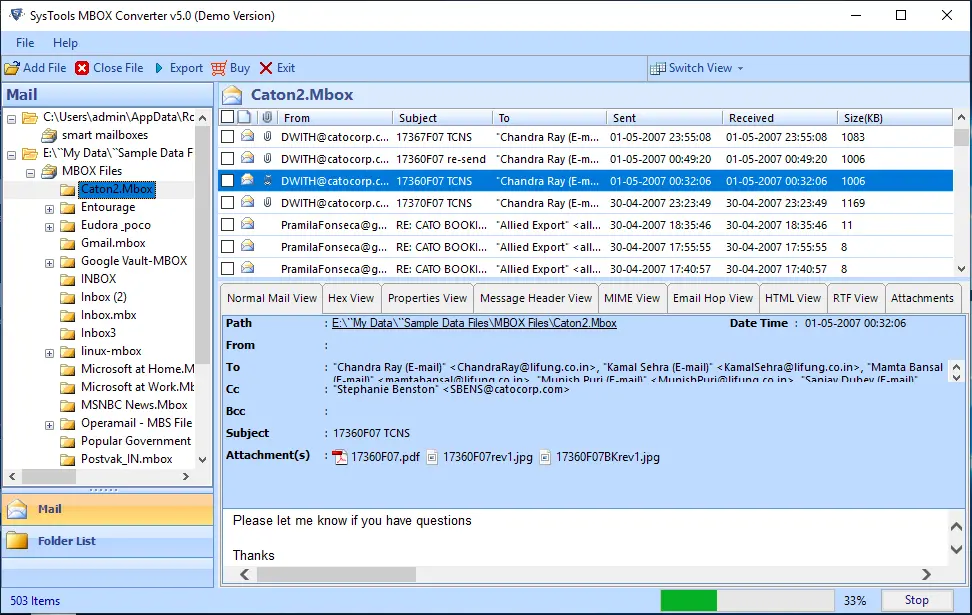
Inspect your mailbox before exporting it. View emails with their attachments and message properties, confirm the source data, and pick the items you need before the final PST is created.

Selective MBOX Conversion with Filters

You don't always need the whole MBOX collection. Choose specific files, folders or emails, then narrow them with date ranges and include or exclude email criteria. This keeps the output focused on the messages that matter for your migration, backup or archive.

Convert MBOX Emails with Attachments

Attachments are a key part of any mailbox. SoftMagnat MBOX to PST Converter processes attachments along with their emails, so documents, images and other files stay connected to their messages in the PST or other output.

Save to a New or Existing PST

Create a new PST for your converted MBOX data, or add it to an existing PST file. This is useful when you want to consolidate MBOX mail with an existing Outlook archive.

Export MBOX to Multiple Formats

Export MBOX data as PST, EML, MSG, PDF, HTML and RTF. That makes the software useful for Outlook migration as well as email archiving and sharing individual messages.

Export MBOX to Office 365

Our tool allow you to export MBOX data directly to Microsoft 365 / Office 365, so you can move mail to the cloud without creating local PST files first.

Supported MBOX Email Clients

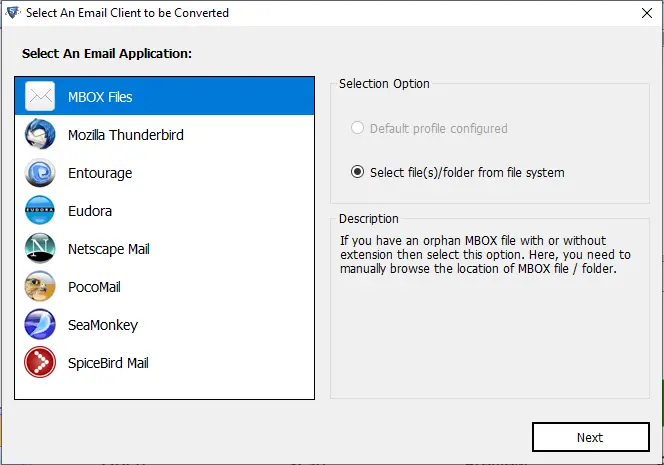
SoftMagnat MBOX Converter tool works with MBOX data from Mozilla Thunderbird, Apple Mail, Eudora, Microsoft Entourage, PocoMail, Spicebird, Netscape Mail, SeaMonkey, Opera Mail, Claws Mail, Evolution, Sylpheed, GnuMail, Mutt, Cone, Mulberry and other MBOX-based applications. It can also process standalone MBOX files when the original client or profile is no longer available.

How SoftMagnat MBOX to PST Converter Tool Works

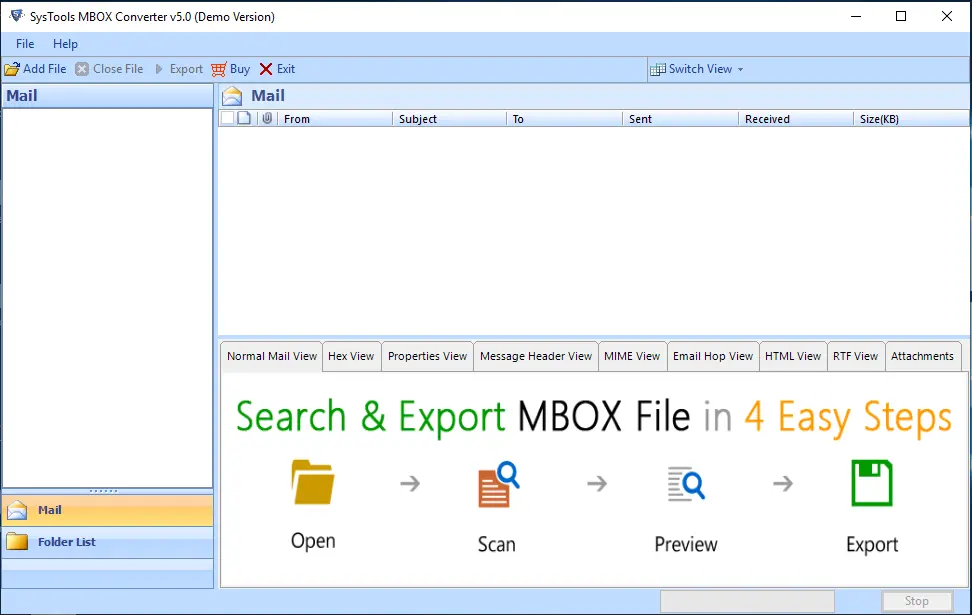
Step 1: Add or Find MBOX Files

Launch SoftMagnat MBOX to PST Converter and add the MBOX files you want to convert. If you don't know where they are, use Find File to search folders, subfolders or drives.

Step 2: Scan and Preview MBOX Data

Let the software scan the selected files. Preview emails, attachments and folders to check the data you want to export.

Step 3: Select Data and Output Format

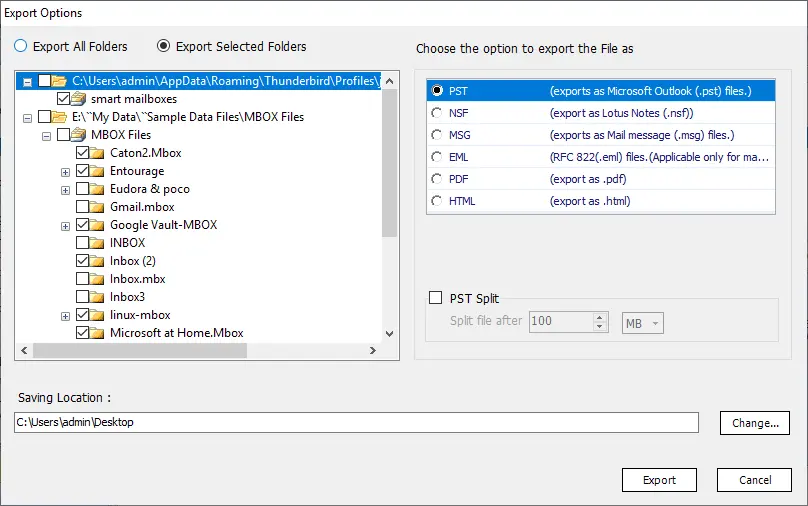
Choose specific files, folders or emails, and apply filters such as date range or email criteria. Then select PST or another supported output format.

Step 4: Convert and Save

Pick a destination and start the conversion. SoftMagnat creates the PST or other output files from your selected MBOX data.

Software Specifications

Make sure your system meets these requirements for a smooth MBOX to PST Converter experience.

Software Download

Trial Limitations

Limitations
The free demo version of MBOX Converter Tool saves 30 emails per folder free of cost.

System Specifications

Hard Disk Space
• At least 100 MB of free space for installation, plus space for scanned and saved mailbox data

Operating System:
• Windows 11
• Windows 10
• Windows 8.1
• Windows 8
• Windows 7

.NET Framework:
• Microsoft .NET Framework 4.5 or later

RAM
• 4 GB is recommended

Processor
• Intel®Core™ 2 Duo CPUE 4600@ 2.40GHz 2.39GHz

Application
Pre-Requisites

Run the tool as Standard/Guest User without asking for admin privilege:

  • • If installation has done using Admin User, then all Users of machines can run the tool without Admin rights.
  • • If installation has done using Standard User with Run as Admin mode, then all Users of machines can run the tool without Admin rights.
  • • If installation has done using Standard User without Admin rights, then only same Standard User can run the tool.

Supported Editions

Input Files – MBOX, MBX, MBS, Mac MBOX, Apple Mail MBOX, and MBOX files without a conventional extension

Output Formats – PST, EML, MSG, PDF, HTML, RTF; Office 365 / Microsoft 365

FAQs

Is your Anti-Virus blocking the software export process?

Please disable the anti-virus temporarily, or allow (whitelist) the software in your anti-virus settings.

Unable to Create Output in Destination?

Avoid sources on NAS, SAN, network or shared drives. Keep the MBOX files on the machine where you run the conversion.

Electronic Delivery

Our delivery process is automated. Once your payment is confirmed, you will receive an email containing both your download link and activation key within a few minutes.

Comparison of Trial & Full Version

Software Features Trial Version Full Version
Add and scan MBOX files yes yes
Convert single as well as multiple MBOX files in one go yes yes
Find MBOX files on your computer yes yes
Support conversion for multiple MBOX-based email clients yes yes
Select MBOX files, folders or emails yes yes
Show preview of all convertible mailbox data before saving yes yes
Save MBOX to PST, EML, MSG, PDF, HTML and RTF yes yes
Saving Limitation 30 items per folder Unlimited
24*7 Tech Support & secure 100% yes yes
  Free Download Purchase now

Frequently Asked Questions

Launch SoftMagnat MBOX to PST Converter, add or locate your MBOX files, then scan and preview the mailbox data. Select the files or folders you need, choose PST as the output format and start the conversion.
Yes. SoftMagnat MBOX file Converter supports batch processing, so you can add multiple MBOX files or folders and convert them together instead of repeating the process for each file.
SoftMagnat can process several MBOX files together and lets you set up the PST output for your conversion. This is useful when you're consolidating mailbox data from many MBOX files.
Yes. The software shows a preview of convertible mailbox data before saving, so you can check emails and attachments and select what you want to export.
Yes. Select the MBOX files or folders you need and use the filters, including date range, to narrow the data before exporting.
Yes. These are all supported MBOX sources. Select the mailbox data, preview the emails and convert them into an Outlook-compatible PST file.
Yes. SoftMagnat MBOX Converter tool processes attachments along with their MBOX emails, so documents, images and other files stay with the messages they came with.
Yes. Besides PST, you can save MBOX emails as EML, MSG, PDF, HTML and RTF files. These are handy when you need individual email files or a PDF for sharing and archiving.
Yes. The Technician edition can export MBOX items directly to Office 365. Select the Office 365, Login and start the migration.
Use the Find File option to search a folder, subfolder or drive. Standalone or orphan MBOX files that you can access on your computer can be selected and converted, even if the original email client is no longer set up.
SoftMagnat MBOX to PST Converter is designed to retain the supported mailbox organization during conversion, so your converted data looks familiar when you open or import it in Outlook.
SoftMagnat offers a free trial that lets you scan and preview your convertible mailbox data. The trial saves 30 emails per folder, and the paid version removes that limit.

What our customers says about this product

This is the great software i had ever used, while i got corrupted my entire data. I realised that it is the best software quickly convert your entire mailbox data into the outlook pst formats. This is the graphical user interface. Thanks for this product and the developer whoe made it very powerful software." Jane A. Ortega Warner Brothers Studio Store, AZ 85635User reviews
I am so glad to use this product provides you to the accurate and effecint result. Everybody can easily use this product without any hassle. The software has an amazing features and fuctionality that helps to work with ease. Any user can easily perform this software without any special skills, only basic computer knowledge is enough for the user." Gloria J. Perez Service Merchandise, BridgeviewClient Testimonials