SoftMagnat EDB to PST Converter is a professional solution to convert Exchange Server EDB files into PST and other formats. It helps you recover and export emails, contacts, calendars, tasks, notes, journals, attachments and mailbox folders from offline, damaged or inaccessible EDB files.
* Download the free trial version to scan & See the preview of all convertible mailbox items.
Use Discount Coupon ( WINTOOLS20OFF ) to Get 20% Discount on Product.
SoftMagnat EDB Converter tool scans offline, damaged or dismounted Exchange EDB files and extracts the accessible mailbox data. It's useful when the Exchange database can't be mounted normally or direct mailbox access isn't available.
Preview the mailbox contents and select only the emails, folders, mailboxes or categories you need. Filters help you narrow the data before exporting, so you don't convert an entire database unnecessarily.
The tool converts EDB data to PST and also exports to EML, MSG, PDF, HTML and other formats. That makes recovered Exchange mailbox data easier to access and manage.
SoftMagnat EDB to PST Converter is an easy-to-use EDB file converter built to give quick and accurate results. Here are its main features.
SoftMagnat converts Exchange database files into Outlook PST files for easier access and migration. It extracts emails, attachments, contacts, calendars, tasks, notes and journals, and saves the selected data into an Outlook-compatible PST file.
The software works with offline Exchange EDB databases, which helps when a live Exchange environment is unavailable. Administrators can add an offline EDB file, scan its mailbox contents and export the accessible data to PST or other formats.
When an Exchange database is damaged, dismounted or inaccessible through normal Exchange operations, SoftMagnat EDB File Converter can scan the EDB file and show a preview of the recoverable mailbox items before export. How much can be recovered depends on the condition of the source file.
EDB files come with different levels of database problems, so SoftMagnat EDB Converter tool gives you two scanning options. Use Quick Scan for normal EDB processing, and Advanced Scan for more complex or damaged databases.
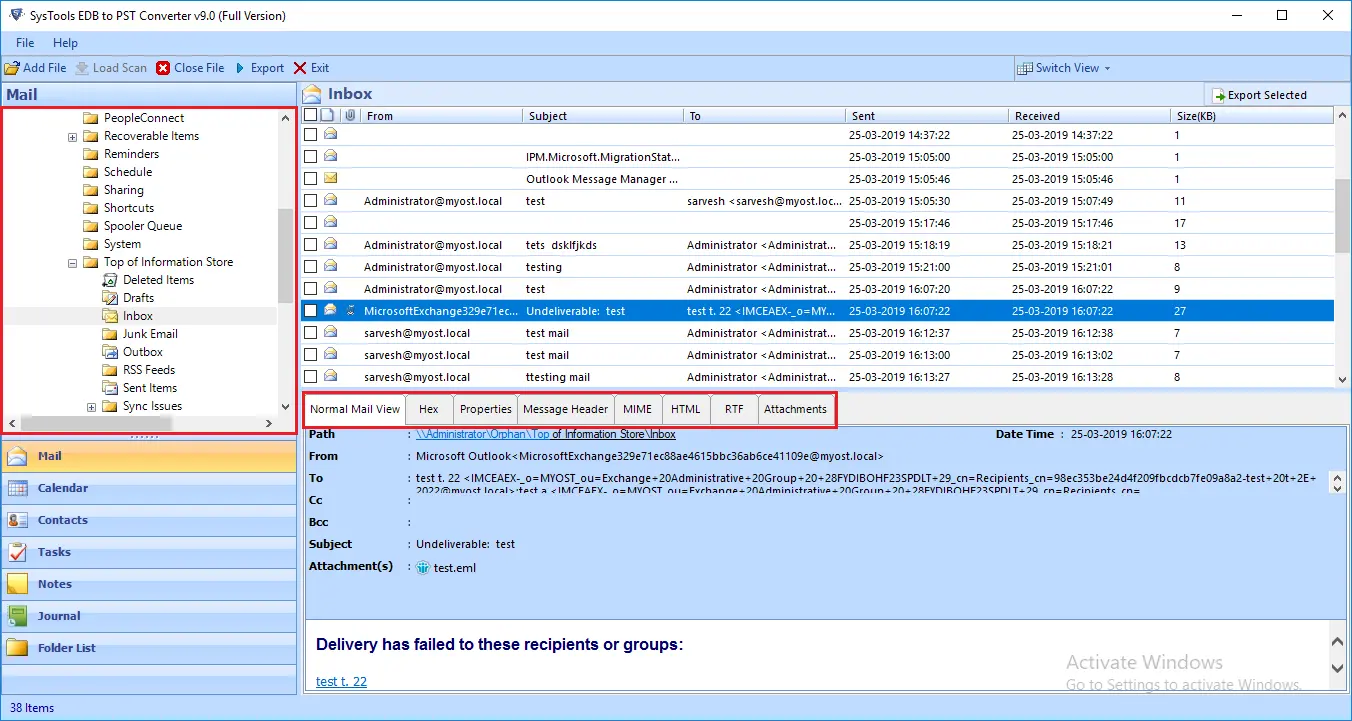
Review emails, attachments, contacts, calendars, tasks, notes, journals and folders inside the software before you save anything. It helps you check the data you need and make selective export decisions.
You don't always need the entire Exchange database. Choose the mailboxes, folders or data categories, such as Emails, Contacts, Calendars, Tasks, Notes and Journals, and export only what your migration or recovery requires.
Use the date filter to export Exchange mailbox data from a particular period. It's handy when you only need recent or historical messages and other items instead of everything in the database.
SoftMagnat is designed to keep the available folder hierarchy, so Inbox, Sent Items, Drafts and your own folders stay organized in the PST. It also retains supported metadata such as sender, recipient, subject and date information.
Attachments are an important part of Exchange mailboxes. SoftMagnat EDB Converter tool extracts attachments along with their emails, so documents, images and other files stay with the messages they came with.
Besides PST, you can save mailbox content as EML, MSG, PDF, HTML, RTF and other available formats, depending on the export option you select.
Exchange databases can hold different mailbox structures and folders. SoftMagnat EDB Migrator tool processes the available private and public mailbox data where the source EDB supports it, and lets you preview and choose what to export.
Not sure which EDB file you need? Use the file search to locate EDB files on the computer and select the right database for scanning. If you work with more than one Exchange database, SoftMagnat EDB Converter tool can process EDB files according to the available options.
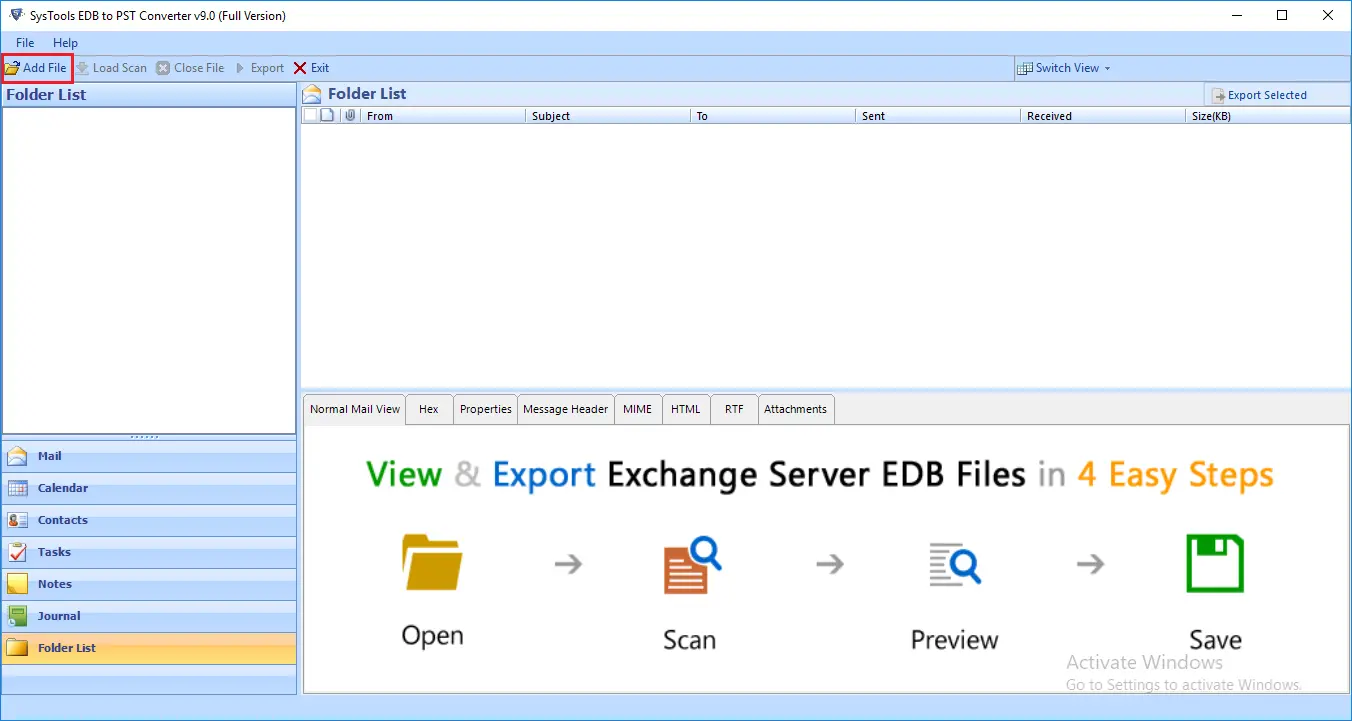
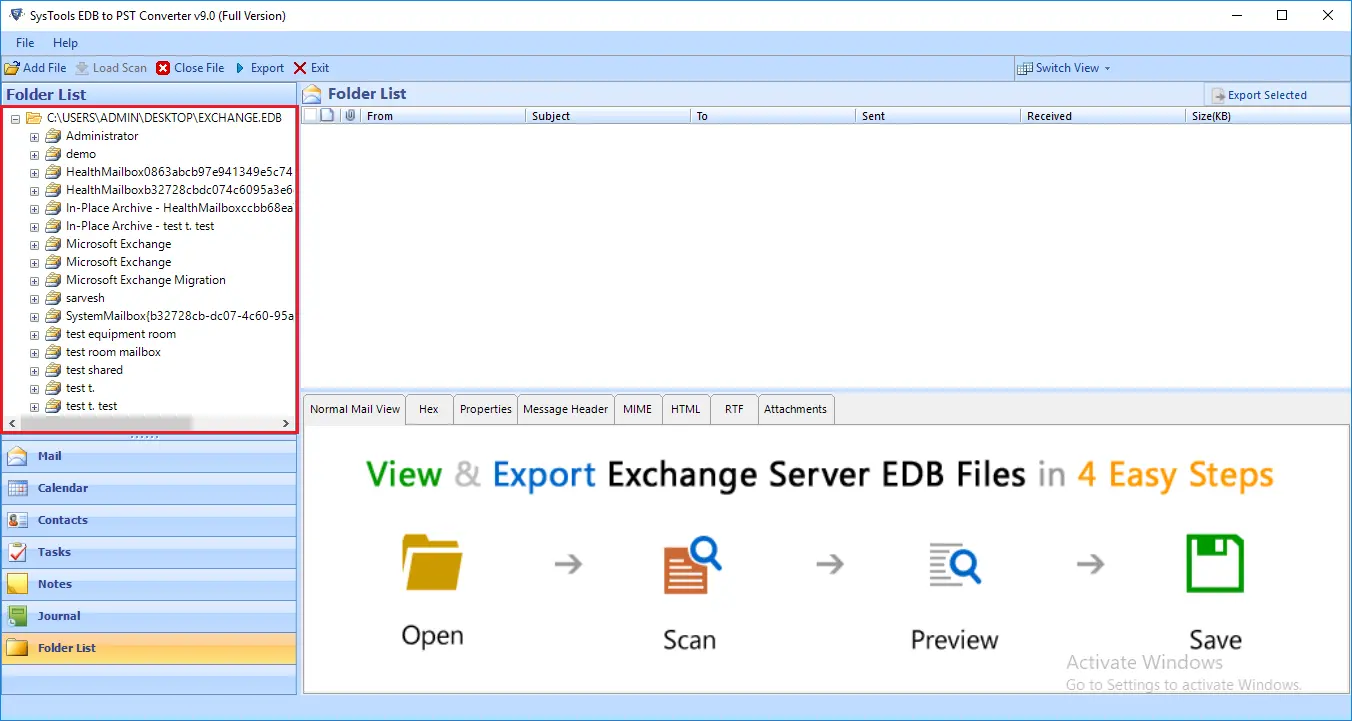
Launch SoftMagnat EDB to PST Converter and add the Exchange EDB file you want to convert. The software scans the selected database and identifies the available mailbox information.
Choose the scan mode and let the software process the EDB file. Preview the available emails, contacts, calendars, tasks, notes, journals and folders before conversion.
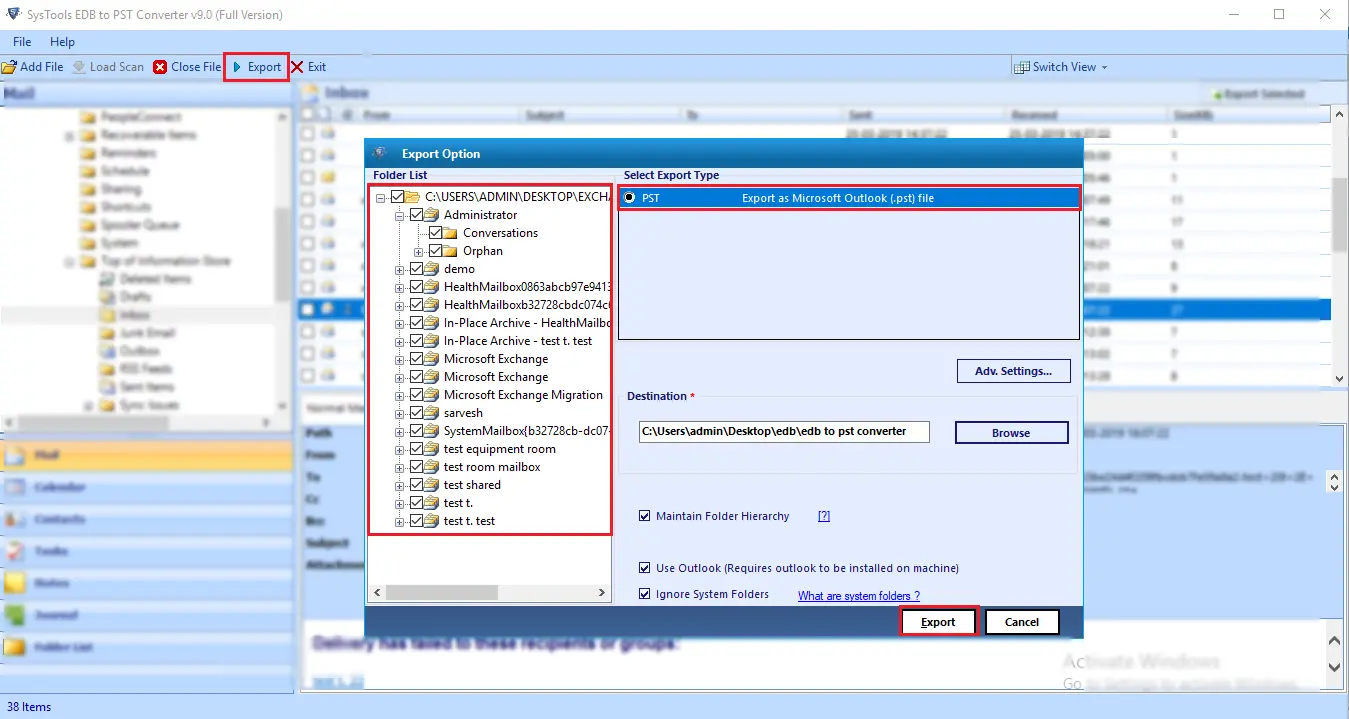
Select the mailboxes, folders, categories or specific items you want to export. Apply date or category filters if you only need particular Exchange data.
Choose PST or another output format, select a destination and start the conversion. The selected mailbox data is exported with the available folder structure and metadata.
Make sure your system meets these requirements for a smooth EDB to PST Converter experience.
Software Download
Trial Limitations
Limitations
The free demo version of EDB Converter Tool saves 25 emails per folder free of cost.
System Specifications
Hard Disk Space
• At least 100 MB of free space for installation, plus space for scanned data and exported PST files
Operating System:
• Windows 11
• Windows 10
• Windows 8.1
• Windows 8
• Windows 7
.NET Framework:
• Microsoft .NET Framework 4.5 or later
RAM
• 4 GB is recommended
Processor
• Intel®Core™ 2 Duo CPUE 4600@ 2.40GHz 2.39GHz
Application
Pre-Requisites
Run the tool as Standard/Guest User without asking for admin privilege:
Supported Editions
Exchange Server – Exchange Server 2003, 2007, 2010, 2013, 2016 and 2019
Microsoft Outlook – 2003, 2007, 2010, 2013, 2016, 2019, 2021, 2024 (32 & 64-bit)
FAQs
Is your Anti-Virus blocking the software export process?
Please disable the anti-virus temporarily, or allow (whitelist) the software in your anti-virus settings.
Unable to Create Output in Destination?
Avoid sources on NAS, SAN, network or shared drives. Keep the EDB file on the machine where you run the conversion.
Electronic Delivery
Our delivery process is automated. Once your payment is confirmed, you will receive an email containing both your download link and activation key within a few minutes.
| Software Features | Trial Version | Full Version |
|---|---|---|
| Add and scan EDB files | ![]() |
![]() |
| Recover data from offline, damaged and dismounted EDB files | ![]() |
![]() |
| Show preview of all convertible mailbox data before saving | ![]() |
![]() |
| Select mailboxes, folders and data categories | ![]() |
![]() |
| Apply date filters for selective conversion | ![]() |
![]() |
| Save EDB to PST, EML, MSG, PDF, HTML and RTF | ![]() |
![]() |
| Saving Limitation | 25 items per folder | Unlimited |
| 24*7 Tech Support & secure 100% | ![]() |
![]() |
| Free Download | Purchase now |