Export Multiple VCF Files to CSV in Bulk: 3 Easy Methods
Quick Answer: To export multiple VCF files to CSV in bulk, merge them into one file (run copy /b *.vcf merged.txt in Command Prompt, then rename it to .vcf), import it into Google Contacts or Windows Contacts and export it as CSV. For hundreds of separate files, load the whole folder into an Outlook PST with SoftMagnat vCard Importer, then export every contact to CSV with SoftMagnat vCard Export Tool.
Contact apps, phones and event scanners often create one .vcf file per contact. That is convenient until you need all of them in a single spreadsheet. Opening 1,500 files one at a time is not realistic, and Excel can’t read VCF files directly. This guide shows three ways to export multiple VCF files to CSV in bulk, what can go wrong and how to check that every contact detail survives the conversion.
Why Bulk VCF to CSV Conversion Is Harder Than It Looks
- Excel can’t open VCF files as tables. A vCard is a text card, not a row of cells.
- Outlook imports vCards slowly. Its importer handles one .vcf file at a time, and Outlook experts note it imports only the first contact from a file that holds several.
- vCard versions differ. Files may use version 2.1, 3.0 or 4.0, and some free converters handle only one version.
- Details get dropped. Second phone numbers, notes, birthdays and non-English characters are the first things lost.
Example scenario: An HR team scans business cards at a conference and receives 2,400 individual .vcf files in a folder. Every file opens fine on its own, but none can go into a spreadsheet until they are combined and converted.
Before You Start: Quick Preparation
- Copy the folder and work on the copy, never the originals.
- Note the file count so you can compare it with the rows in your final CSV.
- Check privacy rules. Business contact lists contain personal data, so think twice before uploading them to free online converters.
Method 1: Merge the VCF Files, Then Convert with Google Contacts (Free)
A vCard file is plain text, and each contact sits between BEGIN:VCARD and END:VCARD. That means you can join many files into one.
- Open the folder with your copied .vcf files and click the address bar. Type
cmdand press Enter to open Command Prompt there. - Run:
copy /b *.vcf merged.txt - Rename merged.txt to merged.vcf. (Using .txt first stops the new file from being swallowed by the
*.vcfpattern.) - Open Google Contacts, choose Import and upload merged.vcf.
- Choose Export, select your contacts and pick Google CSV or Outlook CSV.
Watch out: If a source file doesn’t end with a line break, its END:VCARD may merge with the next file’s BEGIN:VCARD and break that contact. Open the merged file in Notepad and check a few joins. Your contacts also pass through a Google account, which may not suit corporate data policies. Community VBA scripts also exist, but running macros from unknown sources is a security risk in a corporate environment.
Method 2: Use the Windows Contacts Folder (Free)
Microsoft documents this path for turning vCards into a CSV:
- Open File Explorer and go to
C:\Users\<username>\Contacts. - Choose Import, select vCard (VCF file) and click Import.
- Select your .vcf file, then choose OK for each contact and Close.
- Choose Export, select CSV file, name it and click Finish.
Outlook experts report that this importer also accepts a folder of VCF files. The catch is the confirmation box for every contact, which makes 2,400 contacts a long afternoon. It also exports default fields only, so verify that notes and extra numbers appear.
Method 3: Bulk Export with SoftMagnat Tools (Best for Large Folders)
When volume, speed or data completeness matters, a desktop workflow is more dependable than manual steps.
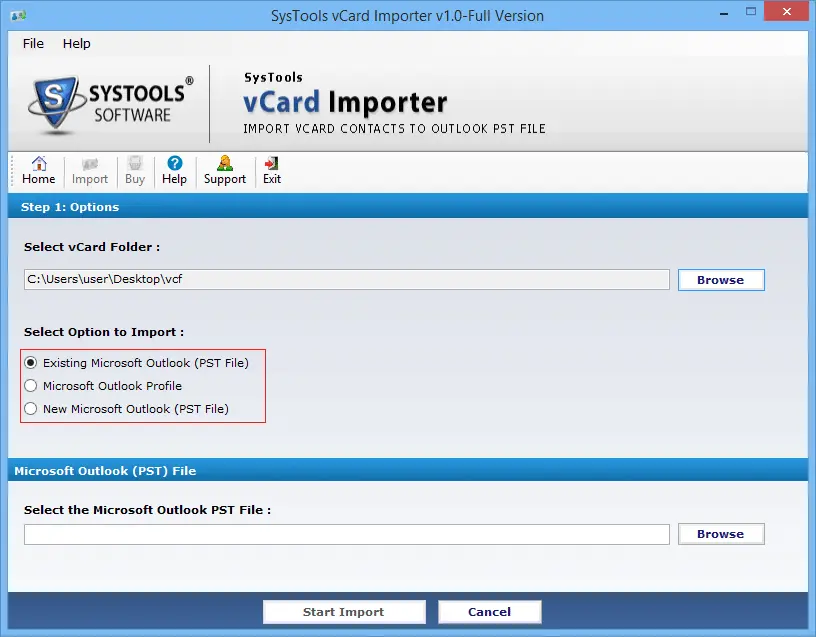
Step 1: Import the Whole VCF Folder into an Outlook PST
SoftMagnat vCard Importer imports vCard files in batch. You can add a folder that holds many files, and it supports vCard versions 2.1, 3.0 and 4.0 and contacts with multiple emails and phone numbers. Save the result to a new PST, an existing PST or your Outlook profile. The tool also shows an import summary, and the vendor says it has been tested with 10,000 contacts.
Step 2: Export the Contacts to CSV in Bulk
Next, open the SoftMagnat vCard Export Tool and add your PST: a single file, a folder of PST files or your default Outlook profile through auto-detection. The software scans the contacts and shows each one with its attributes. Then choose an output:
- Google CSV or Yahoo CSV, which open in Excel
- vCard, either one file per contact or a single combined file
- WAB for Windows Address Book
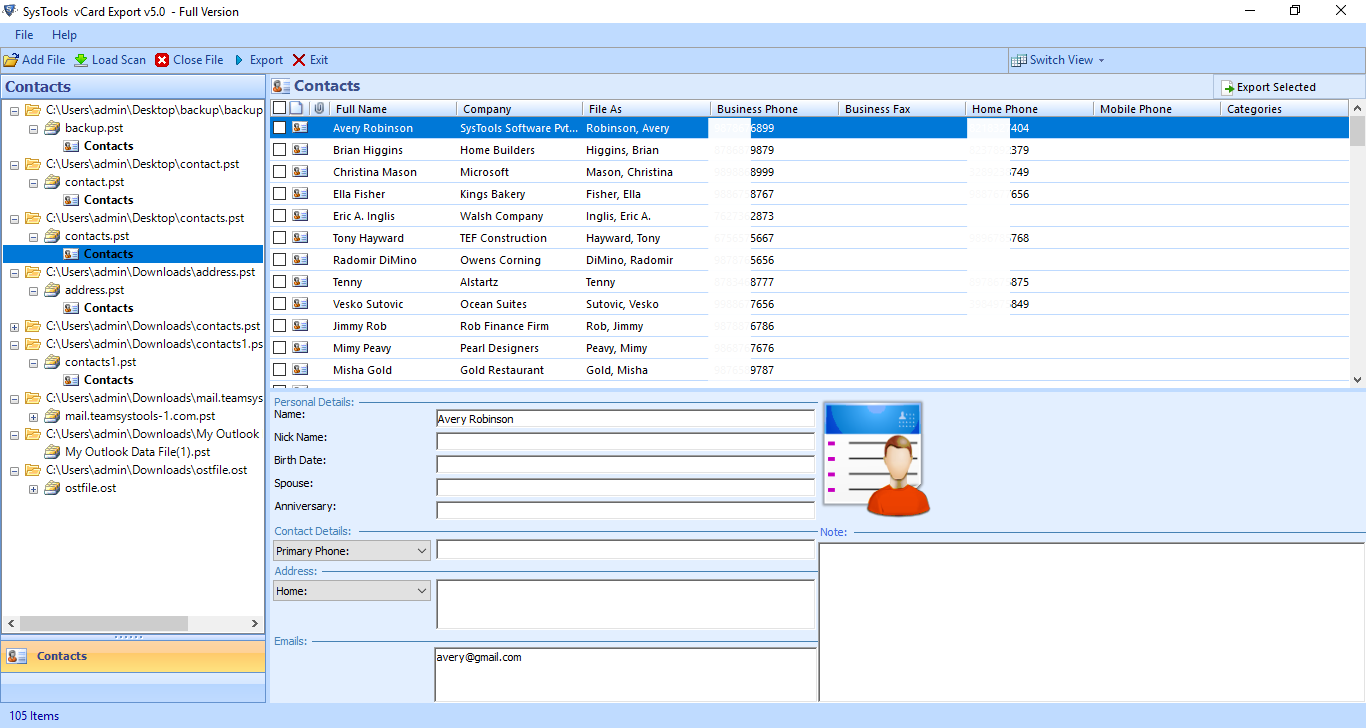
The tool carries over personal details (name, nickname, spouse, anniversary, birthday, image and notes), multiple phone numbers, home and business addresses and multiple email addresses. You can export selected contacts or folders, sort by company, phone, country or postal code, and save to a new folder. It can also extract recoverable contacts from corrupt PST files.
Trial limits: The vCard Export Tool trial previews everything but saves 15 contacts per file. The vCard Importer trial imports the first 5 contacts. Both full versions are unlimited. Both tools run on Windows 11, 10, 8.1, 8, 7, Vista and XP.
Example scenario: An operations lead gets 40 folders of VCF files from regional offices. She adds the parent folder to the importer and saves everything to one PST. She then exports that PST to Google CSV, opens it in Excel and sorts by country, with no per-contact prompts.
Which Method Should You Choose?
| Need | Best option |
|---|---|
| Under about 50 files, no budget | Method 1 or 2 |
| Hundreds or thousands of files | SoftMagnat vCard Importer + Export Tool |
| Mixed vCard versions (2.1, 3.0, 4.0) | SoftMagnat vCard Importer |
| Preview and select contacts before export | SoftMagnat vCard Export Tool |
| Contacts stored in a damaged PST | SoftMagnat vCard Export Tool |
| Data must stay on your own PC | Method 2 or SoftMagnat tools |
After Exporting: Check the CSV Before You Use It
- Count rows and compare them with your original number of contacts.
- Open the CSV through Data > From Text/CSV in Excel, set encoding to 65001: Unicode (UTF-8) and set phone columns to Text so plus signs and leading zeros survive. Our guide on converting VCF to Excel without losing contact details covers this in detail.
- Spot-check five contacts with several phone numbers or emails.
- Remove duplicates on the email column with Data > Remove Duplicates.
Common Problems and Quick Fixes
- Only one contact imported: The merged file may have broken joins, or the importer reads only the first contact. Use Google Contacts or a batch tool.
- Garbled characters: Re-open the CSV with UTF-8 encoding.
- Missing fields: Check that you didn’t accept a limited default field set during export.
- Duplicate contacts: Merge or clean duplicates after export.
Conclusion
To export multiple VCF files to CSV, you can merge the files and convert them for free, but this gets slow and error-prone as the volume grows. For large folders, SoftMagnat vCard Importer and the SoftMagnat vCard Export Tool give you a faster, previewable workflow. Going the other way? Try the Excel to vCard Converter, or browse all SoftMagnat products.
Frequently Asked Questions (FAQs)
How can I export multiple VCF files to CSV at once?
Merge the files into one VCF using the Command Prompt command copy /b *.vcf merged.txt, rename it to .vcf, import it into Google Contacts and export it as CSV. For large folders, SoftMagnat vCard Importer loads them into an Outlook PST, and SoftMagnat vCard Export Tool exports the contacts to CSV in bulk.
Can I merge many VCF files into one file?
Yes. A VCF is plain text, so the Command Prompt copy /b *.vcf merged.txt command joins the files in a folder. Rename the result to .vcf, then check in Notepad that each END:VCARD and the next BEGIN:VCARD sit on separate lines.
Why is only one contact imported from my merged VCF file?
Outlook imports only the first contact from a multi-contact VCF, and a missing line break between merged files can also break contacts. Import the file into Google Contacts instead, or use SoftMagnat vCard Importer to import vCard files in batch into an Outlook PST.
Does SoftMagnat vCard Export Tool convert VCF files directly to CSV?
No. SoftMagnat vCard Export Tool exports contacts from Outlook PST files to vCard, Google CSV, Yahoo CSV and WAB. To start from VCF files, first import them into a PST with SoftMagnat vCard Importer, then export the PST contacts to CSV.
How many contacts can I convert with the free trial?
The SoftMagnat vCard Export Tool trial previews all contacts but saves 15 contacts per file. The SoftMagnat vCard Importer trial imports the first 5 vCard contacts. The full versions have no saving limit.
Is it safe to use online VCF to CSV converters for business contacts?
Be cautious. Online converters upload your contacts to a third-party server, which may conflict with company privacy policies. Offline options, such as the Windows Contacts folder or desktop software like SoftMagnat vCard Importer and vCard Export Tool, keep the conversion on your own computer.

I am a Technical Writer at SoftMagnat Software and having experience around 8 years, focused on creating clear and user-friendly documentation for software products. I simplify complex concepts into easy-to-understand guides, manuals, and tutorials.


